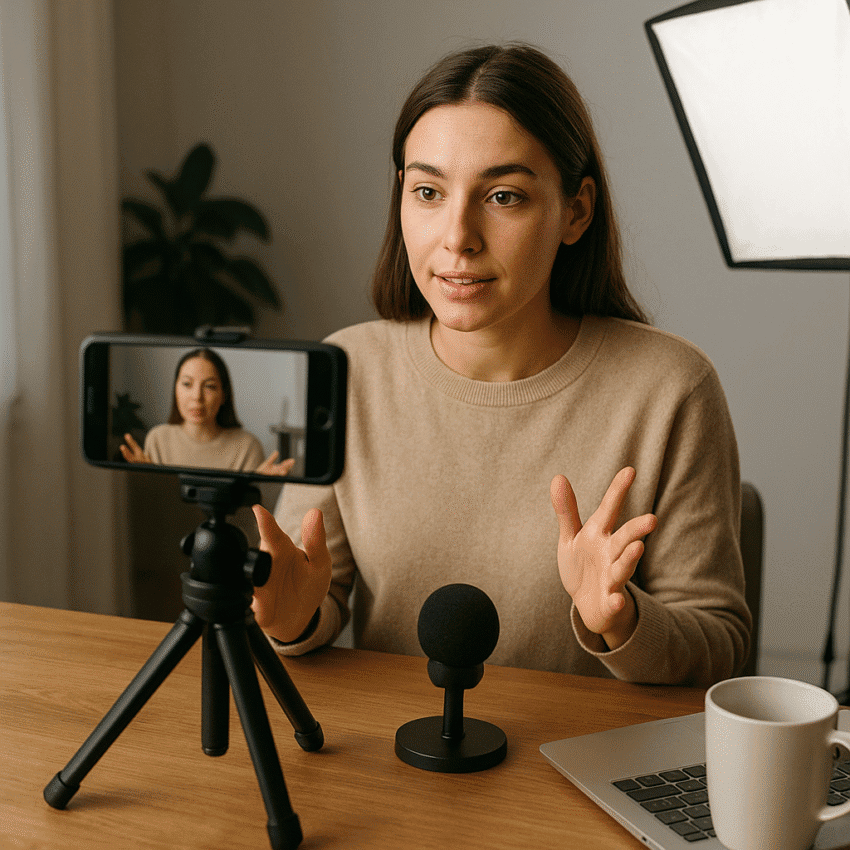
High-quality Reels don’t require a studio, a cinema camera, or a five-figure budget. What they do require is a useful idea, a crystal-clear point of view, and strong execution with the tools you already own. This guide breaks down a practical, repeatable system for planning, shooting, editing, and publishing short-form videos that stop the scroll—without draining your wallet. You’ll find budget gear tips, production checklists, concrete scripting frameworks, and growth tactics that convert views into customers, collaborators, and brand advocates.
Why Short-Form Reels Are Worth Your Time
Short-form video sits at the intersection of habit and discovery: it’s fast to consume, easy to share, and natively designed for mobile attention. Meta reported in 2023 that people reshare Reels more than 2 billion times per day across Facebook and Instagram, a signal that the format spreads beyond your immediate followers. YouTube also confirmed in 2023 that Shorts reaches over 2 billion logged-in monthly users, showing how audience behavior is converging on vertical video across platforms. Marketing industry surveys (e.g., HubSpot’s State of Marketing) consistently rank short-form as a top format for ROI, growth, and lead generation. In other words, mastering Reels builds a skill set you can redeploy on TikTok and Shorts with minimal extra work.
For creators and brands on a budget, the economics are compelling: one well-structured day of shooting can produce weeks of content, and the algorithm’s recommendation engine means a single clip can outperform your follower count by orders of magnitude. Instead of buying gear, invest in learning what keeps people watching. The currency of Reels is attention, and attention is earned through strong hooks, tight pacing, and content that is specific enough to feel personal yet broad enough to be shareable.
Plan It Like a Pro: Low-Cost Strategy That Scales
Define Who You Serve and What You Solve
Start by mapping three content pillars aligned with your audience’s problems. Example for a fitness coach: (1) technique demos, (2) quick healthy meals, (3) mindset and recovery. For a café: (1) menu behind-the-scenes, (2) neighborhood stories, (3) coffee education. Each pillar should promise a repeatable value: teach, entertain, or inspire. Embed your brand’s unique angle—tone of voice, local knowledge, unusual processes—to stand out in saturated categories.
Use a 3×3 Script Framework
Outline scripts with a 3×3 grid: three-second hook, three ideas or steps, three-second close. The hook states a tension or benefit; the body delivers proof in tight beats; the close issues a call-to-action (save, try this tip, comment a keyword). Write for the eye and ear: short, visual sentences; verbs over adjectives. Draft three variations of the hook to A/B test when publishing. This approach enforces brevity and clarity, strengthens your storytelling, and speeds up editing later.
Batch Your Process
Batch ideation on Monday, scripts on Tuesday, shoot on Wednesday, edit Thursday, schedule Friday. One hour of focused ideation with a timer and a search pass (comments, DMs, competitor FAQs) can easily yield 20+ concepts. Convert each into a shot list: opening frame, A-roll (talking), B-roll (supporting visuals), on-screen text moments. Batching reduces context switching and eliminates the hidden cost of setup/teardown, which is where most budgets die.
Shoot With Your Phone, Look Like a Studio
Camera Settings That Matter
Your smartphone is already capable. Use 4K at 30 fps for crisp detail and flexible cropping; switch to 60 fps when you need smooth slow motion (convert to 24/30 fps in edit). Turn on gridlines to align horizons and maintain headroom. Lock exposure and focus by long-pressing the subject so the image doesn’t breathe when you move. If your camera app supports it, set a manual white balance to avoid color shifts between shots.
Stabilization Without a Gimbal
Stability signals quality. Tuck your elbows, hold the phone with two hands, and move from your legs, not your wrists. Use the “ninja walk” (heel-to-toe, knees slightly bent) for tracking shots. Rest your phone on a shelf, stack of books, or a $10 tabletop tripod. For top-down shots, clamp a phone holder to a cabinet shelf. If you must walk, shoot wider (0.5x lens) and crop-in later to reduce visible shake.
Make Natural Light Do the Work
Angle your subject toward a window for soft, directional lighting. Place a white foam board ($5) opposite the window to bounce fill light and a black t-shirt on the shadow side for “negative fill” that adds shape to the face. Avoid mixed color temperatures (overhead tungsten plus daylight) by turning off room lights. For night shoots, clip a $20 LED to a stand and diffuse it with a sheet of baking paper for softness.
Sound First, Always
Viewers forgive average visuals, but poor audio collapses watch time. Record close to the mic: within 30–40 cm. A wired lavalier under $30 outperforms most built-in mics; if you have AirPods or similar, use them as an interim lapel mic when stationary. Reduce echo by hanging a blanket off-camera or recording in a closet. Monitor levels: aim for peaks around -6 dB; avoid clipping. If outdoors, use a foam or furry windscreen.
Backgrounds, Wardrobe, and Props
Uncluttered backgrounds read as premium. Choose one of three looks: clean wall with a plant, bookshelf with intentional spacing, or workspace with symmetry. Wear solid colors that contrast the backdrop. Small props increase visual energy: product in hand, a notepad to write steps, a coffee tamper for café content. Pre-lay props in shooting order to maintain flow.
B-Roll and Transitions That Serve the Story
Record B-roll for every key line: hands demonstrating, screen close-ups, process steps, customer reactions. Capture each at three distances (wide, medium, tight) to give yourself edit flexibility. Use practical transitions—whip-pans, hand covers, match cuts on motion—sparingly. Transitions should underline meaning, not distract from it.
Edit Fast, Look Polished
Pick the Right Tool
Mobile apps like CapCut, VN, and InShot are free or low-cost and cover 90% of needs: cuts, captions, speed ramps, motion graphics templates. On desktop, DaVinci Resolve has a generous free tier with professional color and audio tools. Templates are fine for a start; just customize fonts, colors, and pacing to avoid the “same as everyone else” feel.
Build for the First Three Seconds
Front-load visual information: start on the action rather than a talking head. Combine the hook line with an immediate visual proof (e.g., “Stop your latte art from splitting” over a close-up of a failed pour). Cut silences ruthlessly, keep jump cuts tight, and vary framing every 1–2 sentences. Add kinetic typography only when it clarifies, not decorates. Strong editing isn’t fancy; it’s invisible and purposeful.
Text, Captions, and Safe Areas
Most viewers scroll with sound off at first, so burned-in captions are a practical default. Keep on-screen text above the lower UI and below the top UI (leave a 10% margin). Use high-contrast colors and large fonts for accessibility. Emphasize one keyword per line. Add subtle on-beat pop-ins to mark section changes. If you’re explaining steps, number them vertically on the left so the eye tracks easily.
Color and Sound Polish
Apply a light color correction: adjust exposure, white balance, and contrast before any stylized look. If you use LUTs, keep intensity under 30% to avoid plastic skin tones. Balance music around -24 to -18 LUFS integrated and duck it by -12 dB under dialogue. Use the platform’s native music where appropriate; trending audio can improve discovery via sound pages, but always prioritize clarity of message over a trend bandwagon.
Publish for Discovery and Community
Specs and Thumbnails
Export vertical 9:16 at 1080×1920 or 4K if your phone handles it. Keep bitrate reasonable (8–16 Mbps) to avoid compression artifacts. For the cover, design a thumbnail with the hook as 3–5 words, large type, and an expressive frame. Maintain a consistent visual system (color and typography) so your grid reads like a series.
Captions, Keywords, and Hashtags
Write a 1–2 line lead that expands the hook and a skimmable bullet or short paragraph that delivers extra context or a mini-guide. Embed natural keywords your audience searches for (“latte art basics,” “glute activation drill”) rather than stuffing. Add 3–5 specific hashtags instead of 20 generic ones. Use alt text for accessibility and extra context. Geotag when local discovery matters.
Timing, Frequency, and Momentum
Post when your audience is online, but don’t obsess; quality and consistency beat chasing the perfect hour. A sustainable cadence is three to five Reels per week, supported by Stories that show process and personality. Spark conversation in the caption with a question that’s easy to answer. Pin the most helpful audience comment and reply quickly to create a feedback loop.
Collabs, Remixes, and UGC
Use the native collaboration feature so your Reel appears on both accounts’ grids, multiplying reach. Invite remixes: “Show me your version” prompts creators to attach their take to your original, creating network effects. Repost user-generated clips with permission and credit; UGC is a trust accelerant that proves real-world outcomes.
Measure What Matters and Iterate
Core Metrics
Your north star is watch-time and average view duration; these reveal retention. Secondary metrics—replays, shares, saves, and follows—signpost resonance and utility. Views alone are directional, not diagnostic. Review completion rate by segment (e.g., drop-off at 2–3 seconds) to trace where interest fades.
A/B Testing and Learning Sprints
Test one variable at a time: hook line, thumbnail text, length, or caption lead. Run weekly sprints where you publish two to three variations across similar topics. After 72 hours, document what moved the needle. Convert insights into rules of thumb (e.g., “outcome-first hooks beat process-first hooks by 18% in completion rate”). Keep a living “voice and format” playbook.
Analytics Workflow
Set a recurring 30-minute review meeting with yourself: scan 7-day and 30-day performance, identify top 10% and bottom 10% posts, and write a one-paragraph summary of why. Tie insights to your content pillars and update your shot lists accordingly. This habit compounds more than new gear; sustained analytics thinking turns luck into a system.
Growth Levers That Don’t Cost Much
Micro-Influencer Collabs
Partner with creators who share your audience but not your product. Offer a simple, clear value exchange: a free product, commission, or co-created template. Provide a hook-ready script and a shot list to reduce their lift. Cross-post with proper credits and unique CTAs so attribution is traceable.
Community Flywheels
Run recurring participation prompts: weekly challenges, stitch-this moments, or “duet my result” posts. Feature the best submissions in your next Reel. This taps into creators’ desire for recognition while giving you content and social proof at near-zero cost.
Multi-Platform Repurposing
Save a clean master without watermarks. Duplicate edits to match platform norms: faster pacing and bolder captions for TikTok, utility-forward titles for Shorts, and on-brand covers for Instagram. Craft platform-specific CTAs while telling one consistent narrative about your offer and brand authenticity.
Turn Views Into Revenue
Design a Simple Funnel
Structure content for the full journey: awareness (tips and stories), consideration (comparisons, case studies), conversion (proof, objections handled). Make the next step obvious: a link-in-bio to a free guide, booking page, or starter offer. Use UTMs to track which Reel and CTA angle drive the most clicks and sign-ups.
Offers That Fit the Format
Short-form favors low-friction offers: time-bound discounts, quick-start templates, or 15-minute audits. Surface testimonials as overlays, not separate posts. Show outcomes on-screen (before/after, metric overlays) with one sentence of context. Clear, visible proof beats hype every time and supports ethical monetization.
Budget Gear and DIY Hacks
- Tripod: a $15–$25 lightweight tripod plus a $10 phone clamp covers 90% setups.
- Audio: wired lavalier mic ($20–$30) with a 2–3 m extension; add a $10 windscreen.
- Lighting: $20 clip-on LED with a $5 diffuser (baking paper or shower curtain) for softness.
- Stability: $10 tabletop tripod for overheads; use painter’s tape and a broomstick for makeshift boom arms.
- Reflector: $5 white foam board; for negative fill, a black T-shirt or foam board.
- Backdrops: roll of kraft paper or a clean bedsheet; clamp to shelves with $3 clips.
- Power and Storage: $20 power bank; offload footage to free cloud storage tiers regularly.
Production Checklists
Before You Shoot
- Script trimmed to 100–150 words; hook in first line.
- Shot list with A-roll and 6–10 B-roll moments.
- Battery charged, storage cleared, Do Not Disturb enabled.
- Window light tested; white balance matched.
- Mic test recording; clap for sync if using separate audio.
- Wardrobe contrasts background; props staged.
During the Shoot
- Lock exposure/focus; check framing and headroom.
- Record two or three takes of the hook with different inflections.
- Capture B-roll in wide/medium/tight variants.
- Note the best take immediately to speed up editing.
Before Publishing
- Caption includes clear value and CTA.
- Cover text summarizes the hook in 3–5 words.
- Keywords and hashtags are specific and relevant.
- Subtitles checked for typos and placement.
- End screen prompt: follow, comment, or save.
Niche Examples You Can Copy
Local Café
- Hook: “Why your homemade cappuccino tastes flat.”
- Body: Show milk temperature, foam texture, and pour angle with tight B-roll.
- Close: “Save this for your next morning brew. Comment ‘menu’ for our seasonal drinks.”
Fitness Coach
- Hook: “Stop doing glute bridges like this.”
- Body: Three quick fixes with on-screen arrows; show a side-by-side.
- Close: “Follow for 3x/week drills. DM ‘plan’ for the free PDF.”
SaaS Productivity Tool
- Hook: “One template that cuts your email time in half.”
- Body: Cursor B-roll with magnified highlights; paste the template in captions.
- Close: “Try the free version—link in bio. Comment ‘template’ to get it sent.”
Common Mistakes and How to Fix Them
- Slow starts: Cut any logo stings or greetings; start with the result on-screen.
- Over-long clips: Aim for the shortest version that fully delivers the promise.
- Muddy sound: Move the mic closer, reduce room echo, and duck music.
- Mixed lighting: Kill overheads and commit to daylight or LED—not both.
- Wall-of-text captions: Use short lines, keywords, and a single CTA.
- Random posting: Pick a sustainable cadence and protect it with batching.
- Trend chasing without fit: Filter trends through your audience’s problems and your brand.
A 7‑Day Low-Budget Launch Plan
- Day 1: Define audience, pain points, and three content pillars. Draft 10 hook ideas per pillar.
- Day 2: Write five 3×3 scripts; build shot lists and prop lists.
- Day 3: Set up a simple window-lit set; record all A-roll and B-roll in a 2–3 hour block.
- Day 4: Edit two Reels fully; design cover templates and caption skeletons.
- Day 5: Publish Reel #1; engage intensively for 60 minutes; capture FAQs for new content.
- Day 6: Publish Reel #2 with a different hook variant; start one collaborator outreach.
- Day 7: Review metrics, document lessons, queue three more Reels for next week.
Mindset: Craft Over Cash
The sustainable edge isn’t the newest lens—it’s understanding attention mechanics and how to deliver compact value every single time. Focus on one upgrade per cycle: tighter hooks, cleaner audio, stronger visual proof, clearer CTA. As you iterate, you’ll notice your creative taste sharpening and your process compressing. That’s the moment when a modest setup begins to outperform bigger budgets: the work looks and feels inevitable. Stay true to your message, protect your process, and let compound practice—not gear—do the heavy lifting.
Recap the north stars: lead with a crisp promise, prove it fast, keep your cuts purposeful, and show up with unwavering consistency. Put your audience’s needs first, and let practical craft, honest authenticity, and data-informed iteration guide your path. Your next high-quality, low-budget Reel is one focused afternoon away.